


Jollibee - Order & Rewards
4.8467.00 Reviews
App Specs
- Version
- 4.11.1
- Updated On
- License
- Free
- Downloads
- 100,000+
- Developer
- Honeybee Foods Corporation
- Categories
- Food & Drink
- Platform
- Android
Screenshots
 Analysis by AppCompare
I found Jollibee - Order & Rewards most useful when I wanted to place a familiar fried-chicken order without turning the process into a long phone call. It is a free Food & Drink app from Honeybee Foods Corporation, built around ordering from Jollibee and collecting rewards along the way. The idea is simple, but the quality of the experience depends on how comfortably you can read the screens, make selections, and manage an order while distracted or in a hurry.
After using it as an everyday ordering tool, I see it as a focused companion to the restaurant rather than a complete food-discovery service. It makes sense for regular Jollibee customers who want a direct route to their usual meals and an easier way to keep rewards in the same place. It is less compelling for someone comparing many restaurants, searching broadly for dietary options, or relying on a delivery marketplace for several brands at once.
How the ordering experience holds up in real situations
I find the ordering flow most useful when I already know I want Jollibee and need a moment to make the details clear. In this section, I’ll focus on how that focused approach fits into ordinary routines, including the small checks that can prevent a rushed order from becoming the wrong one.
Readable screens and a fairly direct path
The strongest part of this app is its narrow purpose. You open it to order Jollibee food, not to browse an enormous collection of unrelated restaurants. That focus can reduce decision fatigue. Instead of moving through a marketplace with competing listings, sponsored results, and multiple restaurant pages, I can concentrate on the menu and the order I actually want.
That simplicity matters for people who find dense interfaces tiring. A focused restaurant app usually gives the user fewer competing destinations, and this one benefits from that approach. The restaurant identity is clear, the food-ordering goal is obvious, and the rewards element belongs to the same journey rather than feeling like a completely separate service.
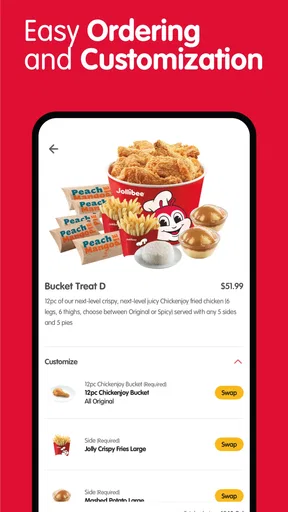
Still, a short journey is not automatically an accessible one. Food menus can become visually busy when they combine photographs, item names, descriptions, prices, customizations, quantities, and promotional material. I found it important to slow down before checkout instead of assuming that the first visible choice represented the complete order. Anyone who reads with difficulty, uses a small screen, or needs more time to process choices should treat the review screen as essential rather than optional.
The app has a current version of 4.11.1 and supports devices running Android 9 or later. That makes the minimum system requirement relevant for people using older phones, shared family devices, or hardware kept specifically for basic tasks. Before planning to depend on it, I would check the operating system on the phone that will actually be used for ordering, especially if the device is several years old.
Worth Reading Before You Choose

EA SPORTS FC Mobile 26 Is a Bigger Football Game, but It Takes Time

Flipboard Shows What News Apps Must Do Beyond the Feed

Switching to Android Auto Means Rethinking Your Driving Routine

Google Calendar Makes a Crowded Week Easier to Manage

Ludo King Makes the Most of the Minutes Between Plans

Baby Panda World Brings Quick Play to Modern Phones, but Its Game Library Feels Busy
Rewards are useful, but they add another layer to remember
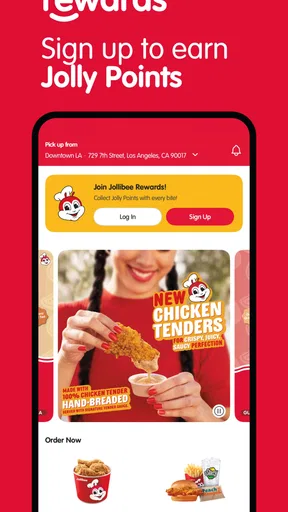
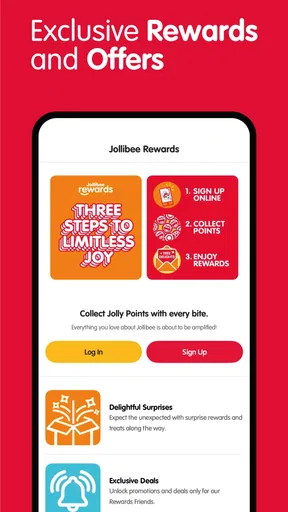
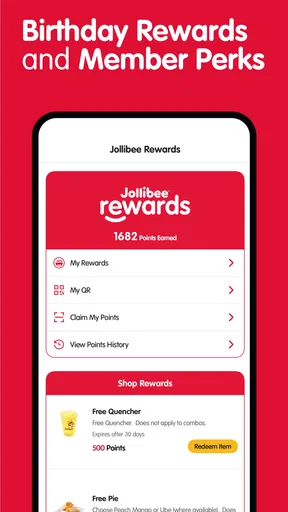
The rewards function gives the app a reason to remain installed after a single order. In my experience, this is more valuable for repeat customers than for occasional visitors. If you already buy from Jollibee, keeping orders and rewards in one restaurant-specific place is more convenient than remembering a separate process every time.
There is also a small attention cost. Ordering and earning are connected, but they are not the same task. A user may focus on selecting food and overlook the rewards side, or concentrate on a reward and fail to review the meal, location, or delivery details carefully. I recommend treating rewards as a bonus after the order is correct, not as the main reason to rush through checkout.
This is one of the app’s less obvious trade-offs: a loyalty feature can make repeat ordering feel more worthwhile, while also adding information that users with limited attention may need to organize. For a person who prefers the fewest possible steps, a direct restaurant order without a rewards layer may feel calmer. For a regular customer who likes tracking benefits, the extra layer is likely worth it.
Using it when hands and attention are already occupied
Consider a realistic evening scenario. I am at home, one hand is busy preparing a side dish, and I realize I need to order dinner. A dedicated restaurant app can be easier than calling because I can inspect the menu quietly, correct the quantity before submitting, and avoid repeating an address or order aloud. The same applies when someone is in a noisy household, sharing a room, or uncomfortable making phone calls.
That convenience has a limit. If you are carrying bags, supervising a child, walking outdoors, or trying to order in poor lighting, the app still requires deliberate visual and touch interaction. I would not begin an order while moving. The better workflow is to sit down, confirm the restaurant details, and complete the process in one calm session. That is particularly important for users who need precise tapping or who can lose their place when interrupted.
For people with hearing-related access needs, an app-based order may remove the need to communicate through a voice call. For people with vision-related needs, the experience depends much more on the phone’s own display and assistive settings, along with how clearly each screen exposes its controls. I would use the device’s text-size, contrast, magnification, or screen-reader tools where appropriate, but I would not assume that every part of the ordering flow will respond perfectly to every setting.
Motor and sensory considerations
Touch ordering can be a real advantage for users who prefer tapping over speaking, but it is not equally comfortable for every hand. Small controls, closely placed choices, or a long customization screen can make accidental selections more likely. My practical advice is to pause after each important choice, especially quantity, pickup or delivery selection, and the final submission step.
A user with tremors, reduced dexterity, or fatigue may benefit from preparing the order when there is no time pressure. Keep the phone on a stable surface, enlarge the interface through the device settings if that helps, and review the basket before paying or submitting. These are simple habits, but they reduce the consequences of one imprecise tap.
Sensory comfort is another consideration. Food apps often rely on photographs, changing content, and prominent promotional presentation. Some people enjoy that visual approach; others find it distracting or tiring. If visual motion or a crowded screen makes ordering harder, I would focus on the text and use the device’s reduced-motion or display preferences where available. The app is easier to use when I treat it as a form to complete rather than an endless browsing feed.
For users with cognitive or memory-related needs, a written order can be easier to verify than a spoken one. The downside is that the user must keep track of several stages: selecting food, checking modifications, confirming the destination, and finishing the order. A helpful routine is to read back the completed basket slowly and compare it with the original plan. This is especially useful when ordering for multiple people, where a missed side or duplicate item is easy to overlook.
Situational access beyond the home
The app can be valuable in places where a phone call is impractical. I can imagine using it during a work break, in a shared office, or while visiting someone who prefers not to speak on the phone. Quiet, text-based ordering also helps when a user is communicating in a second language and wants more time to understand the choices. The app does not remove every language or comprehension challenge, but it gives the user a chance to inspect the order rather than responding immediately to a caller.
It is also a reasonable option for someone who wants to place an order independently. A family member or caregiver may still help, but the visual sequence lets the customer participate directly in choosing food and checking the final basket. That can be more respectful and practical than having another person place every order by default.
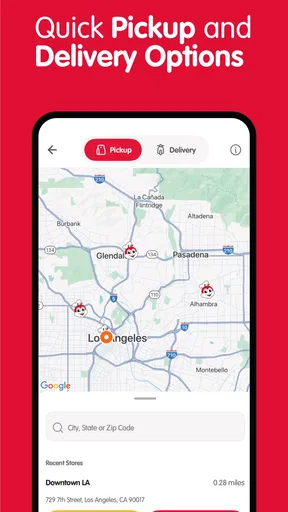
On the other hand, access while traveling or using an unfamiliar location is less straightforward than ordering from home. A user may need to pay close attention to the selected restaurant and delivery details. I would not assume that the nearest branch is automatically the one attached to the order. Before submitting, I would verify the location shown in the flow, particularly when visiting a different neighborhood or ordering for another person.
People with limited data, weak connectivity, or an older phone should also plan for possible friction. The app is a digital ordering channel, so it cannot replace a stable connection or a compatible device. If dinner depends on the order arriving at a particular time, I would avoid leaving the process until the last minute. A restaurant phone call or an in-person order may be a better fallback when the device is unreliable.
Where it compares well with usual alternatives
Compared with calling the restaurant, the app gives me a written record of the choices I made and lets me review them privately. That is helpful when hearing a conversation is difficult, when the environment is noisy, or when I want to avoid repeating a complicated order. It also gives repeat customers a dedicated place for the Jollibee rewards experience instead of separating loyalty from ordering.
Compared with a general delivery marketplace, the app is more focused. I do not use it when I want to compare Jollibee with several other restaurants or combine an order with unrelated grocery and takeaway services. A marketplace may be better for broad discovery, side-by-side delivery choices, or managing many brands in one account. The dedicated app makes more sense when I have already decided on Jollibee and want a direct route.
Compared with ordering in person, the app can reduce conversation and allow more careful reading. In-person ordering may still win for someone who prefers human assistance, has difficulty with touchscreens, or needs to explain an unusual situation. The right choice depends less on which method is universally better and more on whether the user values independence, speed, personal help, or visual confirmation.
Practical barriers I would plan around
The biggest limitation is that the app cannot solve every access problem through its purpose alone. A clear restaurant focus does not guarantee that every menu label, button, image, or error message will be equally understandable to every user. I would test the ordering flow before relying on it for a time-sensitive meal, particularly if I use a screen reader, enlarged text, unusual color settings, or alternative touch controls.
Another barrier is the need to make several decisions accurately. A user who has difficulty distinguishing similar menu items, remembering modifications, or navigating nested choices may need support from a trusted person. That does not make the app unusable, but it changes the best workflow: prepare the order together, let the customer confirm each choice, and use the final basket as the shared checklist.
Rewards can also create expectations that are easy to misunderstand if the user is concentrating on the meal itself. I would check how the reward is represented in the account and avoid assuming that earning and redeeming happen at the same moment. Keeping the order confirmation and any reward information visible until the process is complete is a sensible habit.
There is a similar issue with interruptions. If the phone locks, the user receives a call, or another task takes attention away, returning to the exact point in the order may require rechecking earlier choices. I prefer to order when I can finish without switching between apps. For someone with memory difficulties, writing down the intended meal first can make recovery easier if the session is interrupted.
Who will get the most from it?
I would recommend this app first to regular Jollibee customers who want a direct ordering method and are interested in restaurant rewards. It is also a good fit for people who prefer text-based ordering, need more privacy than a phone call allows, or want to review a meal before submitting it. The free price removes a basic barrier to trying it, and the Everyone content rating makes it suitable for a broad household audience.
The app has a 4.8 average from around ten thousand ratings, with more than four hundred written reviews, and it has passed one hundred thousand installs. Those figures suggest that it is not an obscure experiment and that many people have found a reason to keep using it. I still treat popularity as a starting signal rather than proof that the interface will suit every ability or phone setup.
I would skip it, or use it only as a backup, if I mainly want to compare restaurants, depend on a marketplace that combines several brands, or need extensive personal assistance during ordering. It is also not my first choice when the phone is too old, the connection is unstable, or a specific accessibility setup has not been tested with the complete checkout flow.
My inclusive verdict after using it
Jollibee - Order & Rewards succeeds because it keeps the central task recognizable: choose Jollibee food, submit the order, and build rewards through repeat use. Its focused design can make ordering less socially demanding and less confusing than a broad marketplace, especially for people who prefer written choices and private review. The experience is strongest when the user has a compatible phone, a stable connection, and enough time to check every stage.
My main recommendation is to use a deliberate routine: order from a stable position, enlarge or adjust the phone display if needed, make one choice at a time, and read the final basket before submitting. If another person is helping, let the customer lead the selections rather than taking over the entire process. These habits make the app more inclusive without pretending that a restaurant app can meet every access need automatically.
Overall, I see it as a worthwhile free download for committed Jollibee customers, particularly those who value quiet, self-directed ordering and rewards in one place. I would not call it a universal solution, and I would choose a general marketplace or a human-assisted order in several situations. But for its intended audience, the best reason to use it is the combination of a direct restaurant menu and a repeat-order rewards routine, provided you give yourself time to verify the details.
Pros
- Quickly reorder favorites and customize meals before checkout.
- Rewards points make frequent Jollibee purchases more worthwhile.
- Menu browsing includes meal details
- add-ons
- and available promotions.
- Delivery
- pickup
- and store options are conveniently accessible in one app.
- Order updates help you monitor preparation and delivery progress.
Cons
- Rewards and promotions may vary by location and participating branch.
- Delivery availability and fees can change depending on your address.
- Some menu items may be unavailable during busy periods.
- The app may require location access to show nearby stores and services.
- Checkout can be less convenient when payment or connection issues occur.
FAQs for Jollibee - Order & Rewards
What is Jollibee - Order & Rewards?
Jollibee - Order & Rewards is the official mobile app for ordering Jollibee food, browsing the menu, finding nearby branches, and accessing available promotions. Depending on your location, you can place an order for delivery, pickup, or other supported fulfillment options. The app also includes a rewards section where eligible purchases may earn points or provide access to member-exclusive offers.
Can I order Jollibee food for delivery or pickup through the app?
Yes, the app is designed to support convenient food ordering, although the available options depend on your country, address, store, operating hours, and local Jollibee services. After entering your location, you can usually check participating branches, view the menu, customize selected items, and choose delivery or pickup when available. Always review the final order summary, fees, and estimated preparation time before paying.
How does the Jollibee rewards program work?
The rewards feature allows registered users to receive benefits from qualifying orders or promotional activities, but the exact earning rules can vary by market. You may need to create an account and remain signed in for points or rewards to be associated with your purchase. Before ordering, check the rewards section for current terms, expiration dates, redemption requirements, and participating products or branches.
Does the Jollibee app accept online payments?
The app may offer several digital payment methods, such as credit or debit cards, mobile wallets, or other locally supported options. Available payment choices can differ depending on your country and the selected ordering method. Enter payment information only through the official application, verify the total amount before confirming, and keep your order confirmation in case you need assistance with a failed payment, duplicate charge, or refund.
What should I do if my order is late, incorrect, or missing an item?
If there is a problem with a Jollibee order, first check the order status and confirmation details inside the app. For missing products, incorrect items, delivery delays, or payment concerns, use the in-app help or customer support option as soon as possible. Provide your order number, branch information, receipt, and a clear description of the issue. Resolution options may vary by location and order type.


